
Touchscreen & IoT UX
Clear controls for connected products.
A control interface must make the system’s state and the user’s next action understandable. Design starts with the display, operating conditions and tasks people need to complete.
Touchscreen & IoT UX
A control interface must make the system’s state and the user’s next action understandable. Design starts with the display, operating conditions and tasks people need to complete.
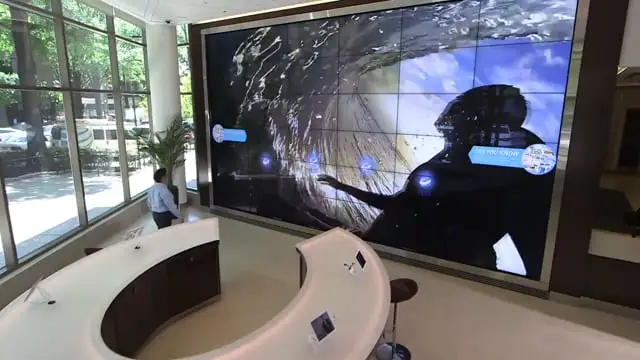
Interactive touchscreen wall. Published portfolio example.
Earlier touchscreen work
The published touchscreen-wall example presents city locations through interactive touch points. Its context differs from equipment controls, but shows work with a physical display and a defined visitor task.
Review the screen dimensions, viewing distance, lighting, touch conditions and how the product is used. Consider setup, everyday operation, alerts and troubleshooting as distinct tasks.
Map normal operation, pending actions, unavailable states, alerts and recovery. For consequential actions, define confirmation behavior, disabled states and the information required before the user proceeds.
A simulation can show normal operation, errors, missing data and recovery without issuing real hardware commands. This lets product and engineering teams examine the intended interaction before connecting it to a live system.
Depending on scope, the handoff can include screen layouts, component states, navigation rules, thresholds supplied by the product team, interaction details and acceptance criteria. Hardware logic, safety requirements and system limits remain explicit engineering inputs.
Evaluation should connect the interface to real tasks. Document the environment, participants or review method, issues found and decisions made. A visually complete screen is not evidence that every system state is correct.
Yes. Begin with the current behavior, technical limits and known usability problems. Preserve necessary functions while evaluating the interface around them.
A review prototype is a simulation unless a separate hardware integration is explicitly scoped and verified.
No. UX design supports clear interaction, but engineering validation and any required safety certification are separate responsibilities.
Start with the task
Share your audience, goal and what already exists.